Friday, December 08, 2006

EPiServer 4.61 Hotfix

Just a quick note that I received a hotfix from EPiServer the other day for version 4.61. I don't think the hotfix has officially been released yet, but if you need it then I suggest you contact the support team [Knowledge Center login required] for a copy.

Here is what the hotfix addresses:

  • #45503 Simple Address always adds a epslanguage parameter when rewriting url
  • #45530 GetPostedData method on XFormData ignores "start date" and "end date" for public overloads of the method
  • #45554 Filenames are not encoded in the file manager
  • #45545 Login cookies does not work with sliding expiration
  • #45579 Copy pages corrupts tblTree
  • #45401 Attaching to the MovingPage event and setting CancelAction to true gives strange GUI behaviour
  • #45635 Users and groups are not sorted by name by default when listing from database
  • #45591 Faulty path to CSS and JS files in Admin/Workflow.aspx
  • #45671 Calls WindowsPrincipal.IsInRole() makes 4.61 sites slow
  • #45562 FieldOrder set to 0 when adding a new property
  • #45436 Fetch data does not work with mirroring
  • #45468 FileManager in ActionWindow is very slow when tblUnifiedPath contains many rows
  • #45804 Add ability to handle negative SIDs
  • #45815 Error message " PropertyData object with name "" already exists" in Edit mode
  • #45816 Export should export the name of the SID for compatibility with EPServer 5.x
  • #45817 Publishing a page in a large site is slow due to tblWorkProperty lacking proper index
  • #45572 Mirrored EPiFields not working (Requires the EPiServer Fields 4.61 HotFix 1 to work)
  • #45575 Custom query strings are lost when making a post back for a page with a friendly url
  • #45858 Added InternalPageDataHelper class
  • #45565 Possible race condition in license handling for multiple sites with the same database
MS-SQL only:
  • #45528 SQL timeout problems after upgrading to 4.61
  • #45821 Deadlocks can occur during simultaneous page publishing
  • #45818 Searching on properties is slow due to poorly optimized sprocs

Tuesday, November 14, 2006

Custom validation for core properties

Last week a colleague of mine asked a question:

Is it possible to limit the amount of data that can be entered into EPiServer text properties?

Now this can be achieved in a number of ways. First, if the property is one you have added, then you can just create a custom property and add whatever type of validation you like, pretty standard stuff. However, if the property is a core property such as "PageName", then you have capture the "EditPageValidators" event in the EPiServer.Global class.

Here is an example I have used for a few clients now to validate the "PageName" to set a maximum number of characters. This same implementation can be used to perform any custom validation against core properties in EPiServer.

In the global.asax, hook the following up in the Application_Start method:

Global.EditPageValidators += new PageValidateEventHandler(Validators.ValidatePageNameLength);

The implementation for ValidatePageNameLength is the following:

public static void ValidatePageNameLength(object sender, PageValidateEventArgs e)
{
int length = (int)Global.EPConfig["EPnMaxPageNameLength"];
if( e.Page.PageName.Length > length && length > 0 )
{
e.IsValid = false;
e.ErrorMessage = String.Format( "\"Name\" must not exceed {0} characters", length );
}
}


This then requires a web.config key of “EPnMaxPageNameLength” to configure the number of characters in the PageName property.

Tuesday, September 26, 2006

Workflow admin pages not displaying correctly

I came across this bug the other day and it has been confirmed by EPiServer as a bug which will be fixed in the next version of EPiServer (0045591: Faulty path to CSS and JS files in Admin/Workflow.aspx).

Issue Description
When working in any of the workflow admin or edit screens, styles sheets, JavaScript files and images are broken.

Reproducing the Issue
The issue occurs when you install the edit and admin modes in a sub-directory in the site. E.g. installing edit mode to "/secure/edit" and admin to "/secure/admin".

With EPiServer Manager 1.3 [login required] you are forced to install edit and admin modes to a directory other than the default. If you choose a structure where edit and admin are not in the website root, referenced resources break.

Fixing the Issue
There are two solutions to this problem:
  1. Move the edit and admin modes back to the website root. Move the edit and admin directories from the current location to the website root, or create virtual directory mappings, then update the web.config to reflect the new locations (EPsAdminDir and EPsEditDir). Make sure you also update the authentication sections to reflect the new paths also.
  2. If you must have the modes in a sub-directory then you can also edit the aspx and ascx html directly (Note that these changes will probably be overwritten with an EPiServer upgrade). Update the relative paths in the html to reflect your site setup. Some of the items you will need to edit are (there may be others):
    • admin\Workflow.aspx
    • admin\WorkflowItem.aspx
    • Util\plugins\WorkflowLogView.ascx
    • Util\plugins\StartWorkflow.ascx
    • Util\plugins\ApprovalTask.ascx

Monday, September 25, 2006

Group notifications in workflow

So you've setup EPiServer workflow and it's all working well, except you can't get email notifications working when using groups in your workflow, why? Well, it's because EPiServer workflow doesn't send notifications to groups, and I'm not sure why not.

This is a feature I have wanted for quite a while now, in fact since my first EPiServer installation. I sent the usual request to EPiServer and it's on the feature request list, but I can't see them implementing this feature as they are moving to Windows WF sometime soon.

Anyway, I have created an HttpModule that enables this functionality. It doesn't require any changes to your workflow, and basically enables the email notifications for groups in a workflow. The module hooks up to the task changed event so when a new group task is created in a workflow, my module then sends the email notification to ALL users in the group (the same email that individuals get). It then stores a flag in the task state to stop it sending the email multiple times.

It currently only works for EPiServer groups, but I imagine it could be extended to work with LDAP and Local groups also (I'll be looking into this myself soon).

If your interested then leave a comment. If I get enough interest I'll see if my employer will let me release this code and I'll post again where it can be obtained from.

Thursday, September 21, 2006

EditX - Get it while it's hot!

A new version of EditX was released today by the EPiServer Research guys. If you haven't heard of EditX before, it is a new cross-browser edit mode for EPiServer that works in FireFox and IE.

The latest update includes the ability to preview before save, add internal links to pages in the editor (FCKeditor) and has a new tab for editing dynamic properties in the page edit screen.

Some of the features I like the best so far are usability enhancements more than anything. For example when you hover over the create new page option in the menu, a list of templates drops out for you to select, rather than having to load a new page listing the templates.

One big improvement is the implementation of the FCKeditor control. While it is not fully integrated into EPiServer, it now allows the selection of internal pages when inserting links and files. The standard editor in EPiServer is good, but just lacks the polish of the FCKeditor and has a number of issues to do with the HTML generated.

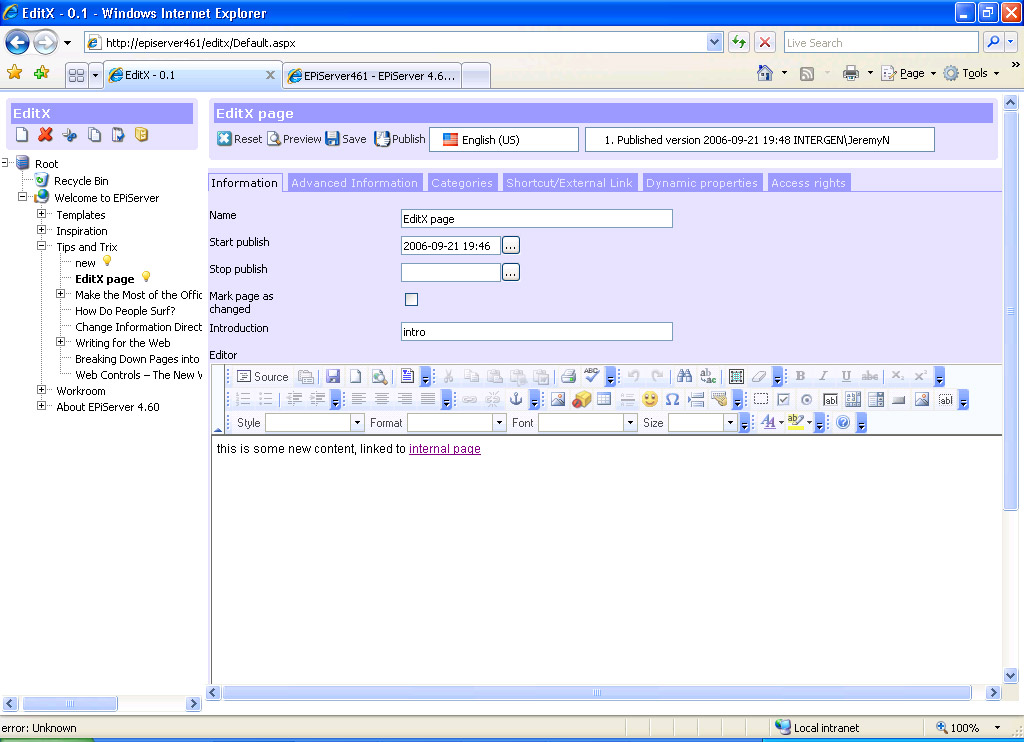
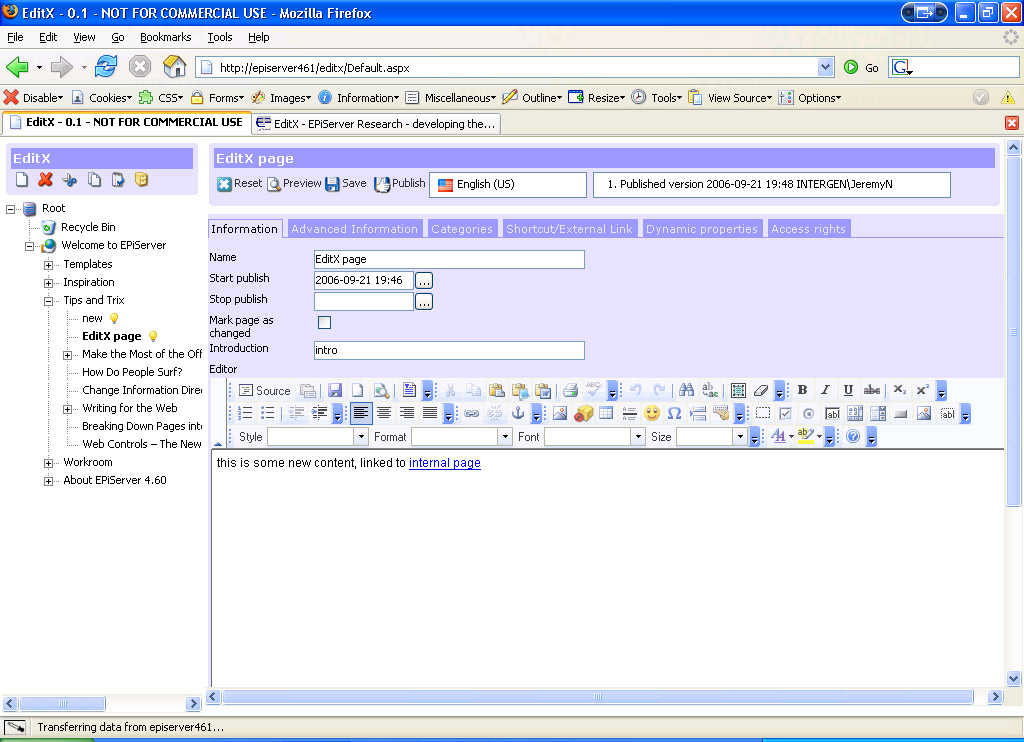
The module is not feature complete, but is at a stage where it is quite usable. Hopefully some of the stuff in this module will end up in a future version of the product. Here's a couple of screenshots, IE 7 vs FireFox.

EditX in IE 7
[EditX in IE 7]
EditX in FireFox
[EditX in FireFox 1.5]

So what are you waiting for? Why are you still reading this, go download it and have a play!

Wednesday, September 20, 2006

MondoSearch Integration Pack v2

Mondosoft logo

This week I got my hands on the tech preview of the new MondoSearch integration pack for EPiServer, and have got to say that I'm really liking the look of it so far. This new version provides much tighter integration with EPiServer and exposes a lot more MondoSearch functionality directly in the EPiServer UI.

The first thing you notice are the new MondoSearch and Behavior Tracking tabs in edit mode. The MondoSearch tab allows you to search over pages in edit mode, similar to the standard search box but is not limited to searching the page name and id fields. The Behavior Tracking tab is the best thing though, integrating some of the analytics and reports from Behavior Tracker directly into EPiServer.

There's some new functionality in admin mode too. From the admin mode tool plug-in you can configure the MondoSearch integration, start the crawler, view the log and check on its status.

To make all this possible three new web services have been created, MSService, BTService and IMService. These web services along with the existing SearchService provide the underlying infrastructure for the new integration pack. The web services use the same MQL query language that you may be familiar with if you have developed with MondoSearch before, for executing requests to a MondoSearch instance.

Anyway, it's looking great and is a much more flexible solution with the web service interfaces. It's currently slated for a mid October 2006 release so will look forward to that date, in the mean time I'll look give the tech preview a thorough work over and will post more about it here soon.

If you want a copy of the tech preview you will need to contact Mondosoft, I sent my request to sales@mondosoft.com.

Thursday, September 14, 2006

In my language please

One thing I find EPiServer does really well is their multi-lingual interface. Basically all text used in the UI is stored in a number of XML files inside the website, each identified with a language code. With a standard installation you get a number of languages out of the box, one of which is English.

Today at work a colleague of mine was finding that the system dates being displayed were in American format and was wondering how to display them in our local format. He had selected "English" as his system default, but this didn't seem to make a difference.

With the default English selection, American formats will be used. Adding a local English option is not only easy but important for a number of reasons. Some of the functions in EPiServer depend on the system language selection. One is the display of regional options such as dates, and another is the language dictionary used for the spell checker.

The language selection list is built dynamically from the list of available languages found in the "lang" installation folder. This makes it quite easy to add your own languages to the list, simply by adding new language files.

For example, to add a New Zealand language option you could do the following:
  1. Make a copy of "languageEN.xml" and call it "languageEN-NZ.xml"
  2. Open the new xml file and edit the name and id attributes on the language node.
  3. Set the name to "English NZ" and the id to "EN-NZ" (the id needs to match an official language code).
  4. Set your system default language in admin mode or user preferred language in edit mode.
  5. Optionally update the language files to your local spelling ;)
  6. One last thing is to check any other language files in the "lang" folder, in case you need to add a language code to them too. One standard file is the "workflow.xml" which will require you to create a set of translations with your new language code.
This is one of the many reasons I really like working with the EPiServer product. Because of features like this you can give your end users a much better experience, without spending a lot of your own time customising.